Getting started
How shatter access works
One-time terms, account setup, downloads and first activation: what happens before your access starts, and what happens after.
shatter access is a one-time purchase for a fixed period. There is no automatic renewal. For Overwatch, the current terms are one, seven and thirty days. The product and purchase pages show the current price for each term before you pay.
Public access has not opened as of this article's publication. The process below explains the purchase and activation flow for when sales are available. Check the product page or status page for current availability.
Choose a term, not a recurring bill
Choose the period that fits how you plan to use the product. A day, week or thirty-day term is a single payment for that amount of access. A longer term does not enroll you in a recurring subscription, and you will not be charged again automatically when it ends.
The amount shown at checkout belongs to the selected product and term. Review it along with the requirements and purchase terms before paying. Availability is separate from pricing: a product can have published access terms while purchases are still closed or temporarily paused.
Buy with your email, then set up your account
You can begin a purchase with an email address without creating an account first. Use a mailbox you can access. After a confirmed purchase, the one-use email link connects the order to its owning account. Follow that link to secure a new account or attach the purchase to the appropriate existing one.
Keep the purchase email until setup is complete. If a payment is still being confirmed, check the existing order rather than submitting another payment. A missing message or temporary problem does not mean you need to buy the same term again. Help and account support provide the next steps.
Download and sign in without starting the clock
Your account's Downloads page shows when the customer download is being prepared and when it is ready. Get the loader there, then sign in using the account that owns it. You can enter your email or chosen username and password in the app, or use Sign in with Shatter to complete sign-in through the website.
Downloading, installing and signing in do not consume the purchased period. They get you ready to use the product. The loader shows your account and access state so you can check them before taking the activation step.
Your first activation starts access
Paid time starts when you explicitly activate the ready product in the loader after its readiness checks. Once activated, the term runs continuously; it is not a bank of gameplay hours. Closing the game or signing out does not pause the remaining time.
Activate within thirty availability days after the download becomes ready. Product-unavailable time does not count toward that activation window. If the window passes, activation requires support review; the deadline does not silently start your paid term. The purchase terms explain this policy in full.
Manage everything from your account
Your account keeps orders, downloads, devices and security controls together. Use the order reference when asking about a payment or download issue. Never include your password or a sign-in code in a support request.
Refunds are exceptional and require owner review; buying unused time does not create an automatic refund right. Verified shatter platform downtime is handled through access-time credit under the published terms. Read those terms before purchasing, and check status first if the product is temporarily unavailable.
Continue reading
Follow the next part of your setup.
 Concept illustration
Buying Overwatch cheats: features, status and access terms
A practical checklist for comparing product evidence, current availability, supported systems, payment terms and support before buying.
 Interface preview
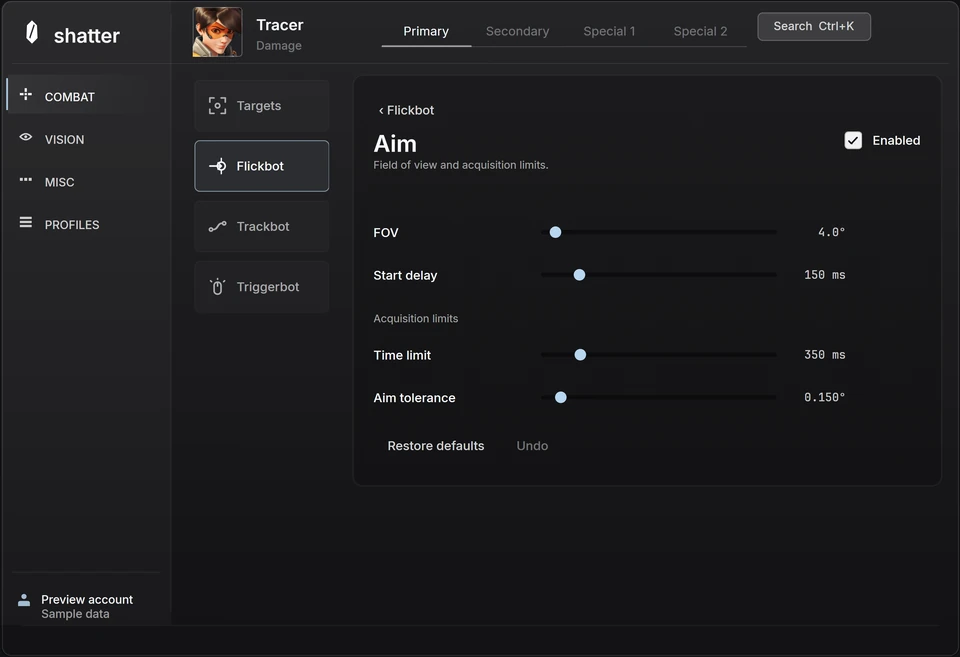
Inside the Overwatch interface
A closer look at shatter's aim controls, player ESP and hero profiles, with a practical way to explore the interactive menu.