shatter / ProductsOverwatch.
Overwatch aimbot and ESP, with controls you can make your own.
01Aimbot controls
Flick or track. Set the feel.
A precise flick and a sustained track ask different things of your setup. Shape each response and activation behavior, choose the shared targeting field of view, then fine-tune the settings around the hero you play.
- Choose the response
- Adjust how your aim moves and settles, with separate controls for flick and tracking behavior.
- Set your priorities
- Choose the targeting area, distance and hitbox priorities. Keep the decisions that matter close at hand.
- Stay in control
- Set your keybinds and activation modes so the setup responds when you want it to.
02Player ESP
Read the fight your way.
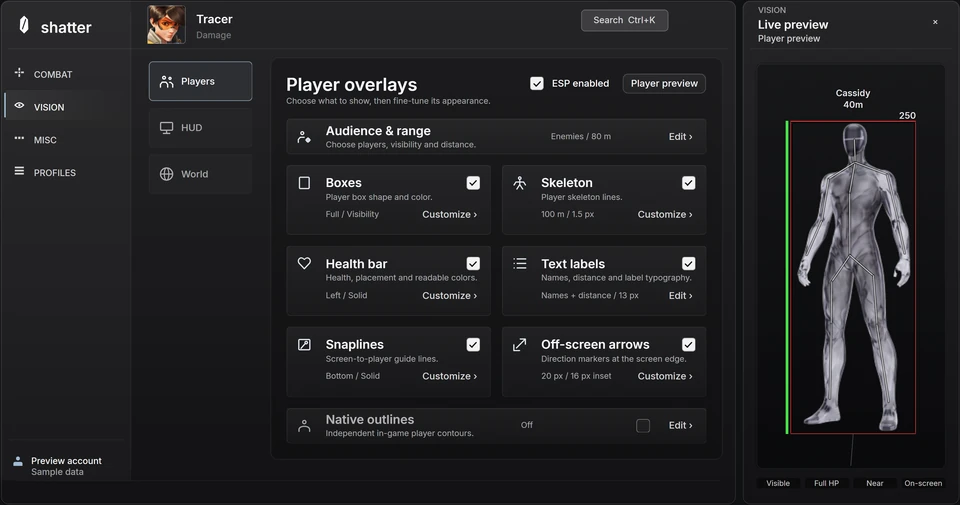
Bring the player information you care about into view. Build an overlay around your preferences, from the shape of a box to the size of a label, and keep the rest out of the picture.
- The information you need
- Configure player boxes, skeletons, health and distance labels. Choose the audience and range for your overlays.
- A look of your own
- Tune colors, line weight and text sizing together. The player preview lets you see your choices as you adjust them.
- Useful at a glance
- Arrange visual details for quick reading instead of filling every part of the screen.
03Hero profiles & interface
Your settings, ready for the switch.
Keep a shared starting point and give individual heroes their own adjustments. Save named profiles, return to a familiar setup and find a particular control without searching through every tab.
- Hero by hero
- Use the hero selector to move between individual configurations while keeping your defaults organized.
- Room to experiment
- Save, switch and restore profiles so trying a different setup does not mean starting over.
- An interface that fits
- Search settings directly and adjust the interface's appearance, scale and reading preferences.