

Game cheats. Your advantage.

Break
the balance.

Aimbot, ESP and the controls to make them yours.
Explore shatter for Overwatch.

Overwatch · In development

Explore shatter

Choose your product.

Aimbot & ESP

Overwatch.

Overwatch cheats with flick and tracking aim, player ESP and controls you can make your own.

  • Choose your aim response and targeting priorities.
  • Configure player visuals and on-screen information.
  • Keep a setup for the heroes you play.
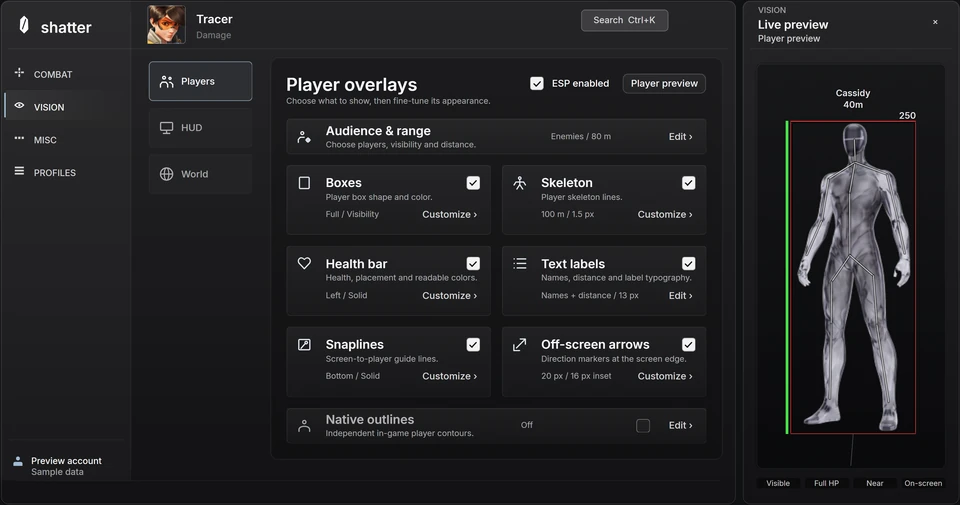
Inside the interface

Aimbot and ESP.
Set up your way.

Explore the controls behind shatter for Overwatch. Adjust sample settings in the browser before choosing your access.

01

Choose how you aim.

Compare flick and tracking response, choose the targeting area and set your activation controls. Build a setup around the way you play.

Explore aimbot controls
02

Decide what stays in view.

Configure player boxes, skeletons, health and distance labels. Adjust colors, sizing and range to keep your ESP readable.

Explore player visuals
03

Buy time. Skip the recurring bill.

Choose 1, 7 or 30 days of access. Your time starts at first activation, and every term is a one-time purchase with no automatic renewal.

How access works

The shatter blog

Know what you’re choosing.

All Overwatch guides

Before you choose

A few straight
answers.

What is shatter?

shatter develops game cheats with adjustable aimbot and ESP controls. Explore the interface, check the features and availability for your game, then choose a one-time access term. About shatter.

Which games can I explore?

Overwatch is the current product. Its page brings the interface, features, access terms and availability together. Explore Overwatch.

Is shatter available to buy?

Public access has not opened yet. You can explore the interface and published terms now; the status page shows current availability. Check status.

Does downloading start my access time?

No. Downloading, installing and signing in do not start your time. Your first successful activation starts the fixed term. Read the access guide.

See it
for yourself.

Explore the interface